Software
Team Productivity Tools: 9 Picks Tested by Operators (2026)
Compare the best team productivity tools for 2026: ClickUp, Slack, Notion and Clockify, with real pricing and free-plan limits. See which fits your team.

Most "best team productivity tools" lists read like brochures. This one is built from running these tools on real teams, where the budget is finite and the wrong stack quietly burns hours every week. Picking the right team productivity tools is less about features and more about matching the tool to the job your team actually struggles with.
Quick answer
The best team productivity tool depends on your bottleneck. Use ClickUp or monday.com for project management, Slack or Microsoft Teams for communication, Notion for docs, and Clockify for time tracking. Most strong teams combine one coordination tool with one measurement layer rather than buying a single all-in-one.
Key takeaways
- There is no single best tool. Match the pick to your real bottleneck: tasks, chat, docs, or time.
- ClickUp's free plan allows unlimited members, which beats monday.com (3-seat minimum) and Toggl Track (5 users) for tight budgets.
- monday.com sells seats in buckets of 5 above the 3-seat floor, so a small team pays more than the sticker suggests.
- Slack and Microsoft Teams organize conversation, not work. Pair them with a task tool.
- The layer most teams skip is measurement. Clockify's free tier covers unlimited users.
How to choose team productivity tools without overbuying
The fastest way to waste money is buying an all-in-one platform when you only have one real problem. Before comparing logos, name the bottleneck out loud.
If work disappears into chat threads, you need a task manager. If nobody can find the latest doc, you need a workspace. If projects run late and you cannot say why, you need time tracking. Buy for that gap first.
Most of these tools follow a software as a service model, so you pay per user every month. If you are still mapping your stack, our business software hub walks through the categories before you commit budget.

Project and task management tools
This is the spine of most stacks. A good task tool makes ownership and deadlines visible so work stops living in someone's head. If this is your main gap, our roundup of the best project management software goes deeper than the three picks below.
That visibility is where most teams recover their first few hours a week. It also exposes who is overloaded before a deadline slips, which a team collaboration tool alone never shows you.
Best all-in-one for tight budgets
ClickUp From $7/user/mo (annual)
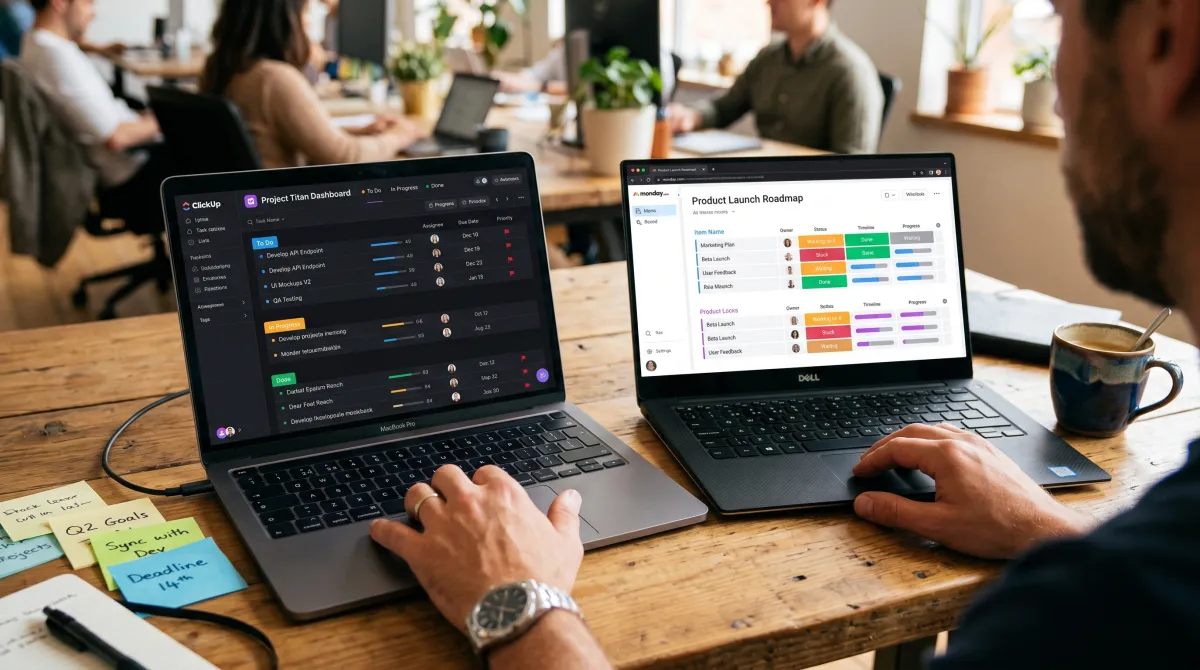
ClickUp tries to be your whole workspace: tasks, docs, dashboards, and AI in one place. The real edge is the free plan with unlimited members, rare among work tools.
Pros
- Unlimited members on the free plan
- Gantt, Kanban, and list views built in
- Consolidates docs and tasks
Cons
- ClickUp Brain AI is a paid add-on from $9/member/mo, billed per paid seat
- Free plan caps total storage at 100MB shared across the team
The all-in-one pitch is real, but read the AI line carefully. Brain is billed for every paid member, not just the people who use it, so a 20-seat team adds roughly $180 a month the moment you switch it on.
Best visual Work OS
monday.com From $12/seat/mo (Standard, annual)
monday.com is the most visual planner here, strong for teams that think in colorful boards. As of June 2026, the Standard tier bundles AI credits, but the seat math is where it bites.
Pros
- Clean, highly visual boards
- Timeline, automations, and dashboards on Standard
- Good portfolio visibility for managers
Cons
- 3-seat minimum on all paid plans (about $36/mo to start on Standard)
- Seats sold in buckets of 5 above the minimum, so a 7-person team buys 10
- Basic has no automations or integrations, so Standard is the real entry point
Best for cross-team visibility
Asana From $10.99/user/mo (annual)
Asana is the cleanest way to see one project across List, Board, Timeline, and Workload views. The gap: it tracks status, not effort, so it cannot tell you if the pace is sustainable.
Pros
- Multiple views of the same work
- Mature, reliable workflow rules
- Strong reporting and dashboards
Cons
- New free Personal accounts now cap at 2 users (legacy accounts kept 10)
- Advanced tier jumps to $24.99/user/mo with goals, workload, and native time tracking
My operator take: for a budget-constrained team, start ClickUp free and only graduate to monday.com or Asana when reporting and governance become the real pain. Each platform's automation and reporting limits differ sharply, so test the free tier against your actual workflow before paying.
| Tool | Entry paid tier | Free plan limit | Best for |
|---|---|---|---|
| ClickUp | $7/user/mo | Unlimited members | All-in-one on a budget |
| monday.com | $12/seat/mo (Standard) | 2 seats | Visual Work OS |
| Asana | $10.99/user/mo | Up to 2 users (new) | Cross-team visibility |
| Notion | $10/user/mo (Plus) | Individual use | Docs and wikis |
| Clockify | $3.99/user/mo | Unlimited users | Time tracking |
Team communication and collaboration tools
Communication tools coordinate people, but they do not organize work. Treat them as the nervous system, not the brain. The best collaboration apps still need a real task layer running behind them.
Best for real-time team chat
Slack From $7.25/user/mo (Pro, annual)
Slack still sets the standard for channel-based messaging, with strong search, threads, and Huddles for instant audio. As of June 2026, AI search and daily recaps are bundled into the Business+ tier at $15/user/mo, while Pro keeps the core messaging and integrations most small teams need.
Pros
- Scales from 5 to 500 people
- Huddles plus deep integrations with task tools
- Fast, lightweight to set up
Cons
- Tasks get lost the moment you try to track them here
- Built-in AI search and recaps require Business+ ($15/user/mo)
Microsoft Teams wins when your company already lives in Microsoft 365. Chat, video, and Copilot AI sit next to Word, Excel, and SharePoint, so you are paying for collaboration you already own. For pure chat speed, Slack still feels lighter and faster to get running.
Chat tools make you feel busy. Task and time tools make you accountable. A productive stack needs both.
Documentation and knowledge management tools
When the latest version of anything lives in five places, your team is paying a hidden tax every time they search. A shared knowledge base fixes that.
Best workspace for docs and wikis
Notion From $10/user/mo (Plus, annual)
Notion turned from a notes app into the most flexible workspace on the market. Its block system builds everything from meeting notes to a full company wiki in one connected place.
Pros
- Endlessly flexible blocks and databases
- Great for wikis and roadmaps
- Capable free tier for individuals
Cons
- As of June 2026, full Notion AI is bundled only into the Business tier at $20/user/mo, no longer a cheap standalone add-on
- Weak on dependencies and time tracking
Use Notion as the place answers live, not where work gets executed. Pair it with one of the task tools above and you remove most "where is that doc" friction. For lighter capture, Todoist reads natural language like "write a report by Friday" and files it automatically, which suits individuals and small teams; the Pro plan runs about $4/user/mo billed annually.
Time tracking and productivity measurement tools
This is the layer most stacks skip, and it is the one that tells you the truth. Coordination tools organize work; only time tracking shows how long it really takes and what it costs.
Best free time tracking for teams
Clockify From $3.99/user/mo (annual)
Clockify is built for coverage over flash. The free plan supports unlimited users, so distributed teams can capture time across the whole org without per-seat anxiety.
Pros
- Unlimited users on the free plan
- Kiosk mode, auto-tracker, calendar view
- Cheapest paid entry tier here
Cons
- Billable rates and invoicing need a paid plan (Basic up)
- Lighter on profitability forecasting
Toggl Track is the alternative when you want cleaner reporting and project profitability. The free plan caps at 5 users, the Starter tier runs $9/user/month annually, and the Premium tier with timesheet approvals sits at $18/user/month. Choose it when margins and timer speed matter more than free coverage.
Measuring effort is the foundation of any real time management system, and it is the data point coordination tools cannot give you on their own.
Building a productivity stack that actually works
The strongest teams I have run did not buy the biggest platform. They paired one coordination tool with one measurement layer and stopped there.
A typical lean stack: ClickUp or Asana for tasks, Slack for chat, Notion for docs, Clockify for time. Each tool does one job well, and you avoid paying for overlap you never use.
Resist the urge to consolidate everything into one app on day one. Adopt the task tool first, prove the habit, then add the next layer only when a real gap appears.
Related guides
Related guides
Frequently asked questions
What are team productivity tools?
Team productivity tools are software that helps a group plan, communicate, document, and measure work in one place. They typically fall into four categories: task management, communication, knowledge management, and time tracking.
What is the best free team productivity tool?
For task management, ClickUp's free plan is the most generous because it allows unlimited members. For time tracking, Clockify's free plan also supports unlimited users, making the two a strong free starter combination.
Do small teams need an all-in-one tool?
Usually not. Small teams get more value from one focused task tool plus one measurement layer than from a heavy all-in-one platform. Buy for your single biggest bottleneck first, then expand.
Is Slack a project management tool?
No. Slack is a communication tool. It is excellent for real-time chat and quick decisions, but tasks and deadlines get lost in threads. Pair it with a dedicated task manager like ClickUp or Asana.
How much do team productivity tools cost in 2026?
Entry paid tiers range from about $3.99/user/month for Clockify to $24.99/user/month for Asana Advanced, billed annually. Watch for hidden costs like monday.com's 3-seat minimum and ClickUp's per-seat AI add-on.