Software
CRM Software for Small Business: 6 Tools We Tested (2026)
Best CRM software for small business, tested on real pipelines. HubSpot, Zoho and simple CRM tools compared on price, AI and followup. See which fits your team.

Buyer's guide · Tested by operators
CRM Software for Small Business
Picking CRM software for small business shouldn't feel like decoding enterprise sales decks. You need a simple CRM that tracks leads, fires a followup reminder, and gets out of your way. We ran six CRM tools on real pipelines, and below is the honest verdict on which one fits your team.
Quick answer
For most small teams, HubSpot CRM is the best CRM software for small business because the free plan is genuinely usable and it scales as your business grows. If you want budget-friendly simplicity, Less Annoying CRM wins; if you want deep automation at a low price, Zoho CRM is the pick.
Key takeaways
- Best overall: HubSpot CRM, the free CRM that grows with you.
- Simplest: Less Annoying CRM, built for small teams new to CRM.
- Best value automation: Zoho CRM, an inexpensive CRM packed with AI.
- Pick by business needs, not feature count. An easy-to-use CRM beats a bloated one.
- Every CRM here offers a free plan or free trials, so you can test before you commit.

What Is the Best CRM Software for Small Business?
The best CRM software for small business is the one your sales team actually opens every day. A CRM system stores customer data, tracks every deal in your sales process, and reminds you to follow up before a lead goes cold.
Customer relationship management, at its core, is simple. You log a contact, note the conversation, and the CRM platform keeps the history so nothing slips. The trap is overbuying: many small businesses pay for an enterprise CRM solution and use 10% of it.
We judged each CRM app on four things: setup time, daily friction, automation depth, and price. A modern CRM should let you import a spreadsheet, connect your email, and start tracking leads inside an afternoon. If you're building a wider stack, our small business software guides cover the tools that pair with it.
The right CRM isn't the one with the most features. It's the one your team still uses in month three.
Best CRM Software for Small Business Compared
Here is how the six CRM tools stack up on price, automation, and who each one is built for. Use it to shortlist before reading the full verdicts below.
| CRM | Best for | Free plan | Starting price | AI / automation |
|---|---|---|---|---|
| HubSpot CRM | Best all-round small business CRM | Yes (generous) | $15/user/mo | Strong AI, easy automation |
| Zoho CRM | Inexpensive CRM with deep features | Yes (3 users) | $14/user/mo | Excellent, AI assistant (Zia) |
| Less Annoying CRM | Simplest CRM for small teams | Free trial | $15/user/mo | Light, reminder-focused |
| Pipedrive | Visual sales process | Free trial | $14/user/mo | Good, sales-cycle automation |
| Freshsales | Built-in phone and email | Yes | $11/user/mo | Solid AI lead scoring |
| Capsule CRM | Simple CRM software for solos | Yes (2 users) | $18/user/mo | Basic but tidy |
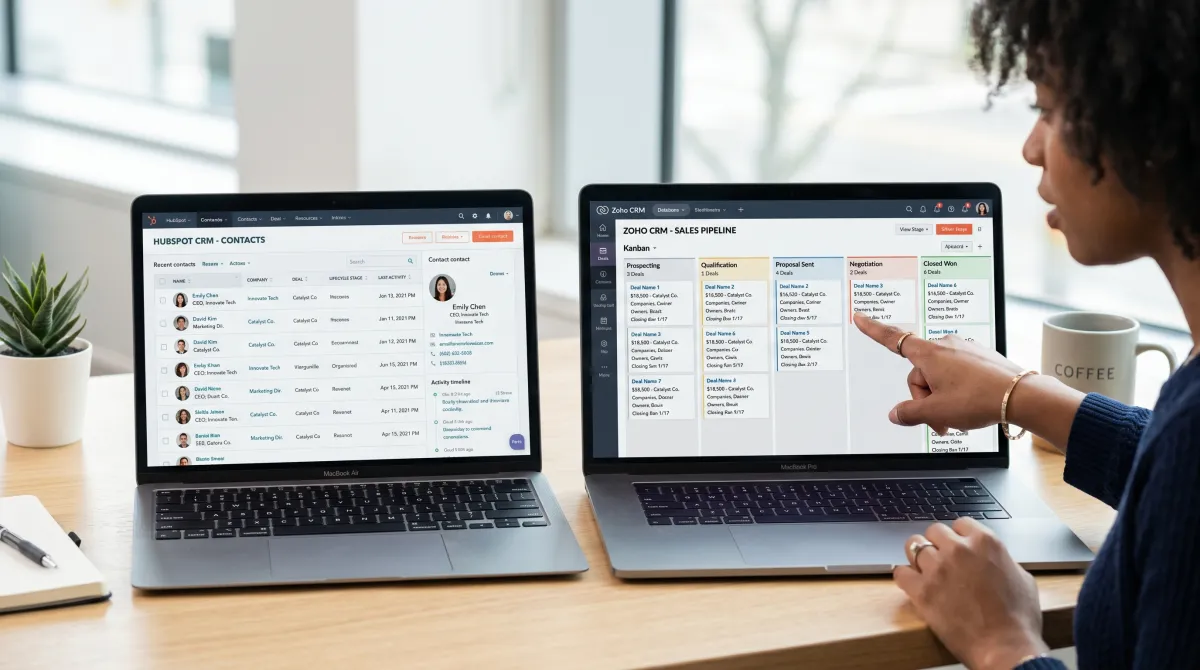
The Best CRM Tools for Small Businesses, Reviewed
Below are our verdicts after running each CRM solution on a live pipeline. These are the CRM solutions for small businesses we trust, tested on real deals to see how each one handles CRM data as your business grows.
Best CRM software overall
HubSpot CRM Free, paid from $15/user/mo
HubSpot CRM is the easiest free CRM to recommend. The free plan covers contacts, deals, email tracking, and basic automation, enough to grow your business before you pay a cent.
Pros
- Genuinely useful free CRM, no time limit
- Clean, easy-to-use CRM interface
- Strong AI and marketing tools as you grow
Cons
- Paid tiers jump in price fast
- Some features feel marketing-heavy
Best inexpensive CRM
Zoho CRM Free, paid from $14/user/mo
Zoho CRM gives you automation and AI usually reserved for pricey suites. Zia, its AI assistant, surfaces customer insights and flags deals at risk in your sales cycle, so you close deals before they stall.
Pros
- Budget-friendly CRM with deep features
- Automate workflows without extra cost
- Integrates with the wider Zoho suite
Cons
- Steeper learning curve than rivals
- Interface can feel busy
Simplest CRM for small teams
Less Annoying CRM From $15/user/mo
If you need a CRM and you're new to CRM, Less Annoying CRM lives up to its name. It stays simple for small teams: one flat price, no tiers, and a reminder system that keeps your followup on track without any clutter.
Pros
- The simplest CRM software we tested
- One transparent price, no upsells
- Excellent support for small teams
Cons
- Light on automation and AI
- Fewer integrations than HubSpot or Zoho
Pipedrive, Freshsales, and Capsule round out the field of simple CRM tools. Pipedrive maps your sales process as a visual board so you track leads at a glance, Freshsales bundles phone and email, and Capsule is a simple CRM for solo operators who just need to manage contacts and tasks. All three are CRMs like Zoho in spirit: designed for small businesses, not enterprises.
How to Choose CRM Software for Small Business
Finding the right CRM comes down to matching the tool to your business processes, not the longest feature list. The best CRM software for small businesses fits how you already work. Run this short checklist before you choose a CRM for your small business.
- Match it to business needs. Solo founder? A simple CRM beats a CRM platform with 200 settings. A five-person sales team needs automation built for small businesses.
- Check the free plan. The best CRM for small business lets you test on real CRM records before paying. Use the free trials.
- Confirm it integrates. Make sure the CRM syncs with your email, calendar, and accounting software. A CRM that won't integrate creates double entry, so connect your CRM early.
- Compare CRM features that matter. Ignore the spec sheet. Score each tool on the three or four CRM features your team uses daily, like followup reminders, lead tracking, and pipeline views.
- Plan for growth. Pick a new CRM that scales as your business grows, so you migrate CRM data once, not yearly.
One overlooked benefit of small business CRM tools is forecasting. When every contact and deal lives in one CRM account, you stop guessing your sales cycle and start closing deals on a schedule. That clarity is real business development: using CRM data to run your business with intent instead of reacting to it.
The payoff lands once you connect CRM to the apps you already use. Sync email, calendar, and invoices, and the tool stops being a data-entry chore and starts saving your team hours every week.
Security matters as much as fit. Whatever customer relationship management software you pick, pair it with the right security software for small business so client data stays protected as you scale.
Watching Your Budget Beyond the CRM
CRM software is one line on a small business budget. Many owners pair it with free accounting software, a secured business credit card to build a business credit score, and inventory management software for small business to keep stock tight.
Sourcing supplies cheaply matters too. Plenty of owners lean on a Costco membership business account and shop in person, checking Costco business center locations for bulk pricing. If you're mapping a route, the up-to-date Costco business centers locations list is worth a quick look before a supply run.
Bundle these well and your customer relationships, your books, and your stock all stay in sync, which is the whole point of running lean tools and one of the quiet benefits of small business systems that talk to each other.
Tools That Pair Well With Your CRM
Your CRM rarely runs alone. Connect it to a few well-chosen apps and you remove the manual busywork that eats a small team's week. Our roundup of productivity tools for teams goes deeper on the stack.
- Email and calendar: the backbone of any CRM system, so contact history and meetings log automatically.
- Accounting software: link invoices to deals so finance and sales share one source of customer information.
- Project tools: gantt chart software keeps delivery on track after you close the deal.
- HR software: as you hire, your team and customer data scale together without extra spreadsheets.
Related guides
CRM Software for Small Business: FAQ
Can ChatGPT make a CRM?
ChatGPT can't replace a CRM, but it can help you build a basic one. It writes formulas, drafts a spreadsheet structure, and suggests fields, yet it won't store or sync customer data or send followup reminders. For real customer relationship management, use a dedicated CRM app.
Can I build a CRM in Excel?
Yes, you can build a simple CRM in Excel for a handful of contacts. A spreadsheet with columns for name, deal stage, and next action works at first. It breaks down once you need automation, reminders, or a sales team sharing live data, which is when a real CRM solution pays off.
What is the most inexpensive CRM?
The most inexpensive CRM is usually a free plan. HubSpot CRM and Zoho CRM both offer free tiers for small teams. Among paid options, Freshsales (from $11/user/mo) and Zoho are the most budget-friendly CRM tools for small businesses.
What are the 4 types of CRM systems?
The four types are operational (automating sales and support), analytical (turning customer data into insights), collaborative (sharing information across teams), and strategic (building long-term customer relationships). Most small business CRM tools blend operational and analytical features in one platform.
What are the best business credit cards for small businesses?
The best business credit cards depend on spend. For most owners, the best business credit card pairs cash back with no annual fee, while the top rated business credit cards for travel reward heavy spenders. If you're building credit, a secured card is the safest start. Compare the best credit cards for business by reward category before you apply.
Disclosure: some links above are affiliate links. If you buy through them we may earn a commission at no extra cost to you. We only recommend CRM tools we have tested.
For background on the discipline behind these tools, see customer relationship management, how automation removes manual work, and the role of artificial intelligence in modern CRM.