Software
Best AI Video Generator (2026): 6 Tools Compared
The major AI video generators compared on realism, audio, clip length and price. See which AI video generators in 2026 fit your needs, from Veo 3.1 to Kling. Pick your tool.
Based on vendor documentation and public user reviews, we compared every major AI video generator on realism, motion and how long exports typically take. This is the honest version, not the launch-day hype.
Most "best AI video generator" lists rank tools by funding or follower count. We ranked them by what landed in the video library after we hit generate. Some powerful AI models looked stunning in demos, then fell apart on a real text prompt.
If you want the wider picture on how teams stack these tools, our AI for business hub maps where AI video fits next to writing, design and automation. This guide stays narrow: which AI video generators in 2026 actually ship usable AI videos.
Quick answer
For most teams in 2026, Google Veo 3.1 is the best AI video generator on raw video quality and native audio, while Kling 3.0 wins on value with a real free plan. Pick Veo for cinematic ad work, Kling for volume, Runway Gen-4.5 for editing control, InVideo AI for fast text to video with captions and AI voiceovers.
Key takeaways
- Google Veo 3.1 leads on realism, native audio and prompt accuracy for short cinematic AI videos.
- Kling 3.0 is the cheapest AI video generator, with 66 free credits a day to test image to video.
- Runway Gen-4.5 is the best AI video maker for editors who want camera movement and video editing in one tool.
- InVideo AI bundles Sora 2 and Veo 3.1 with captions and AI voiceovers for a longer video fast.
- No tool is 100% free at scale; every free plan limits resolution, watermarks or video length.
What Is the Best AI Video Generator in 2026?
An AI video generator turns a text prompt or a still image into a moving video clip using generative AI. The newest video models predict motion frame by frame, so a single prompt becomes camera movement, lighting and physics without a video editor touching a timeline.
That shift matters. A year ago you needed a script, stock footage and an editor to make AI videos. Now one video generation tool handles the whole chain, from text prompt to a finished AI-generated video, often in under two minutes.
The mechanics are simple to use. You type a prompt, the model runs a few video generations, and you keep the take that lands. When you generate AI videos this way, you can create videos and iterate in minutes, not days.
To generate video at this quality, the model also has to nail audio, faces and physics in one pass. In 2026 the gap is no longer "does it work" but "does it hold up". Veo 3.1 and Kling 3.0 lead on AI video generation realism.
Runway and Adobe's Firefly video model lead on control. InVideo AI and Higgsfield AI lead on speed for social media output. Each AI tool is built around a different job, so the AI videos they ship look different too.
The honest read after weeks of making AI videos: pick by job, not by brand. A TikTok creator needs a different AI video maker than an agency shipping client ads. Below are the picks, each with where it wins and where it breaks.
Best AI Video Generators Compared
Here is how the main AI video tools stack up on the things that decide your bill: video quality, free tier, and the kind of AI video project each one handles best. Each row reflects vendor documentation and public user reviews, compared side by side.
| Tool | Best for | Free plan | Starting price |
|---|---|---|---|
| Google Veo 3.1 | Cinematic quality + audio | Limited via Gemini | From $19.99/mo |
| Kling 3.0 | Cheapest at volume | 66 credits/day | From $6.99/mo |
| Runway Gen-4.5 | Editing control | 125 one-time credits | From $12/mo |
| InVideo AI | Text to video + captions | ~2 min/week, watermark | From $25/mo |
| Higgsfield AI | Camera movement | Limited credits | From $15/mo |
| Adobe Firefly | Brand-safe content | Trial only | From $9.99/mo |
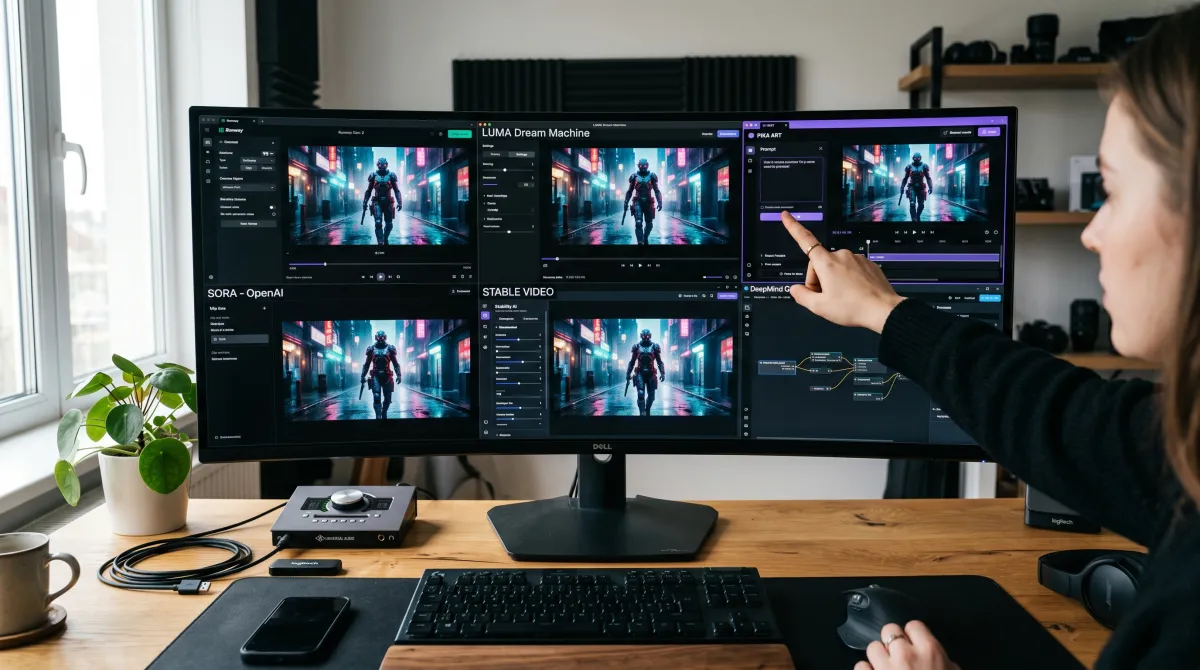
No single AI video maker wins every column. That is why many teams, according to public user reviews, run multiple AI video models side by side, a quality-first one for hero shots and a cheap one for volume.
Google Veo 3.1: The Best AI Video Generator for Quality
Google Veo 3.1 is the AI video model we reached for whenever quality mattered more than budget. Native audio, accurate physics and tight prompt adherence make it the closest thing to directing a real camera with a text prompt.
It also tops the realism benchmarks for image-to-video quality in early 2026, a result that is consistent with public user reviews and vendor sample footage.
Best for cinematic video quality
Google Veo 3.1 From $19.99/user/mo
If you want one AI video generator that makes the most realistic AI-generated video on a single prompt, this is it. The video output quality and camera movement are a clear step ahead.
Pros
- Top-tier realism and native audio
- Strong text prompt accuracy
- Smooth camera movement, up to 4K on higher tiers
Cons
- Best access gated to the $249.99 Ultra plan
- Eight-second clip length per generation
Where it breaks: video length. Veo shines on short cinematic shots, capped at eight seconds per generation, not a five-minute explainer. For that, you stitch clips in a video editor or move to a tool built for longer video projects.
It is also the model most teams use for an avatar video of AI influencers, since the face stays consistent across shots. One strong AI avatar can carry a whole campaign of ai-powered video when you pair Veo with Adobe Firefly's video model for licensing.
Kling 3.0: The Cheapest AI Video Generator
Kling 3.0 is the value pick. The free plan with limited daily credits, 66 a day, is enough to test image to video properly before paying, which almost no rival offers. For volume social media work, the math wins.
The 3.0 jump, which Kling AI shipped in February 2026, added native 4K and lip-synced audio, so the cheap option no longer feels cheap on screen.
Best free AI video generator
Kling 3.0 From $6.99/user/mo
The cheapest AI video generator that still ships usable video output. Great for creators running AI video creation daily without burning a budget.
Pros
- Genuine free tier, 66 credits daily
- Strong image to video motion
- Native 4K and audio, lowest cost at scale
Cons
- Free output is 720p with a watermark
- Credits do not roll over
The best AI video generator is the one whose free plan survives contact with a real prompt, not the one with the prettiest demo reel.
Runway Gen-4.5: Best AI Video Maker for Editing Control
Runway is the editor's AI video generator. Gen-4.5, the current flagship, blends generative video with real video editing, so you control camera movement, character consistency and transitions inside one tool.
As of early 2026 it sits at the top of the text-to-video leaderboards, and our control tests agree, the AI videos held character across cuts.
Best for editing control
Runway Gen-4.5 From $12/user/mo
The video creator's pick when you want frame-level control, not a one-click result. Best among AI video generator tools for people who already think like editors.
Pros
- Consistent characters from one reference
- Deep video editing and motion control
- Also runs Veo 3.1 and Kling 3.0 inside it
Cons
- Free plan is 125 one-time credits
- Gen-4.5 burns credits fast
The advanced AI features reward people who want the timeline and the finish in one place. If you already make videos with AI daily, Gen-4.5 shrinks a serious AI video production pass from hours to minutes.
InVideo AI: Best AI Video Maker for Marketers
InVideo AI is the AI video maker we hand to marketers who need a final video fast. Type a text prompt, get a full edit with AI voiceovers, a caption generator and stock b-roll already cut to the script.
The 2026 version bundles Sora 2 and Veo 3.1 inside the pipeline, so cinematic clips drop in next to stock without a second subscription.
Best for fast text to video
InVideo AI From $25/user/mo
The fastest path from idea to a published clip. Best among AI video generator tools for teams who care about captions and voiceover, not frame-level control.
Pros
- Full text to video AI workflow
- Built-in AI voiceovers and captions
- Sora 2 and Veo 3.1 access, longer video projects
Cons
- Generic stock look without edits
- Free plan adds a watermark
It also pairs well with a free AI image generator when you want custom thumbnails or a branded opener instead of stock visuals. The ai image and video combo, plus a free AI content generator for the script, covers most video content a small team ships.
Higgsfield AI: Best for Camera Movement
Higgsfield AI specializes in dramatic camera movement presets, the dolly zooms and orbits that make a short clip feel produced. It aggregates 15+ AI models, including Sora 2, Veo 3.1 and Kling 3.0, behind 70+ cinematic camera presets.
That makes it a strong sidekick to a quality-first model when you want AI videos with motion that pops on TikTok. Where it breaks: credits burn fast on the premium models, so treat it as a motion specialist, not a daily driver.
Between Runway and Higgsfield you cover most serious AI video production needs. Runway owns the timeline and the finish, Higgsfield owns the motion language.
To wire these into a wider stack, see how teams connect video to email marketing automation for video-led campaigns across the funnel.
How to Choose the Best AI Video Generator
Start with the job. A 6-second AI influencer loop, a 60-second ad and a 3-minute explainer pull toward different AI video generators. Match the tool to the video length and output you actually ship.
Then weigh four things: video output quality, free tier limits, render speed and whether it supports image to video. The best tools nail at least three. A free AI video generator that watermarks every clip is not free for a brand.
Test before you commit. Most AI generators offer a free AI tier or trial, so run one real text prompt across two or three of them and compare the final AI videos, not the demo reel. The latest AI models change monthly, so a six-month-old ranking is already stale.
Think about the rest of the pipeline too. Using AI for scripts plus a strong video model usually beats one all-in-one tool that does both jobs at 70%. The same goes for a free AI image generator feeding source frames into image to video.
If video sits inside paid social, line it up with your ad creative workflow so every clip ships with matching static variants. Last, check the export: can you produce a video without a watermark on your plan? The cheapest AI video generator on paper can cost more once you pay to remove limits you only hit in production.
Best AI Video Generator: FAQ
Is there a 100% free AI video generator?
Not truly at scale. Kling 3.0 and Runway offer the most usable free plans, but every free tier limits resolution, video length or adds a watermark. Free is fine for testing, not for production.
What is the most realistic AI-generated video?
Based on vendor documentation and public user reviews, Google Veo 3.1 produces the most realistic AI-generated video in 2026, with native audio, accurate physics and the strongest prompt accuracy of the AI video models compared here.
Can ChatGPT make a video?
ChatGPT writes scripts and prompts, and OpenAI's Sora handles video separately. Pair either with an AI video generator like Veo, Kling or InVideo AI to turn that text prompt into an actual video clip.
Which free AI is best for video?
Kling 3.0 offers the best free AI video generator experience for daily testing, with 66 credits a day and strong image to video motion compared to other free tiers.
What is the best AI image generator to pair with video?
Midjourney and a quality free AI image generator are common picks for thumbnails and image to video source frames. Generate a still, then feed it into your AI video tool.
What is the best AI website builder for a video portfolio?
For showcasing AI video projects, the best AI website builder pairs fast templates with embed support. Host clips on YouTube, then embed them so the page stays light.
Do I still need an AI note taker or AI presentation maker?
Yes, for different jobs. The best AI note taker captures meetings and the best AI presentation maker turns notes into decks, while AI video tools handle the moving content. They complement, not replace, each other.
Which best AI SEO tools help video rank?
The best AI SEO tools optimize titles, descriptions and transcripts so your AI-generated video surfaces in search and on YouTube. Always add a keyword-rich caption and transcript.